


Lodge a Claim
If you're an Incolink Victorian or Tasmanian member, lodging an Accident or Illness claim is easy. Scroll down to download your relevant form.
Read MoreWhere to start?
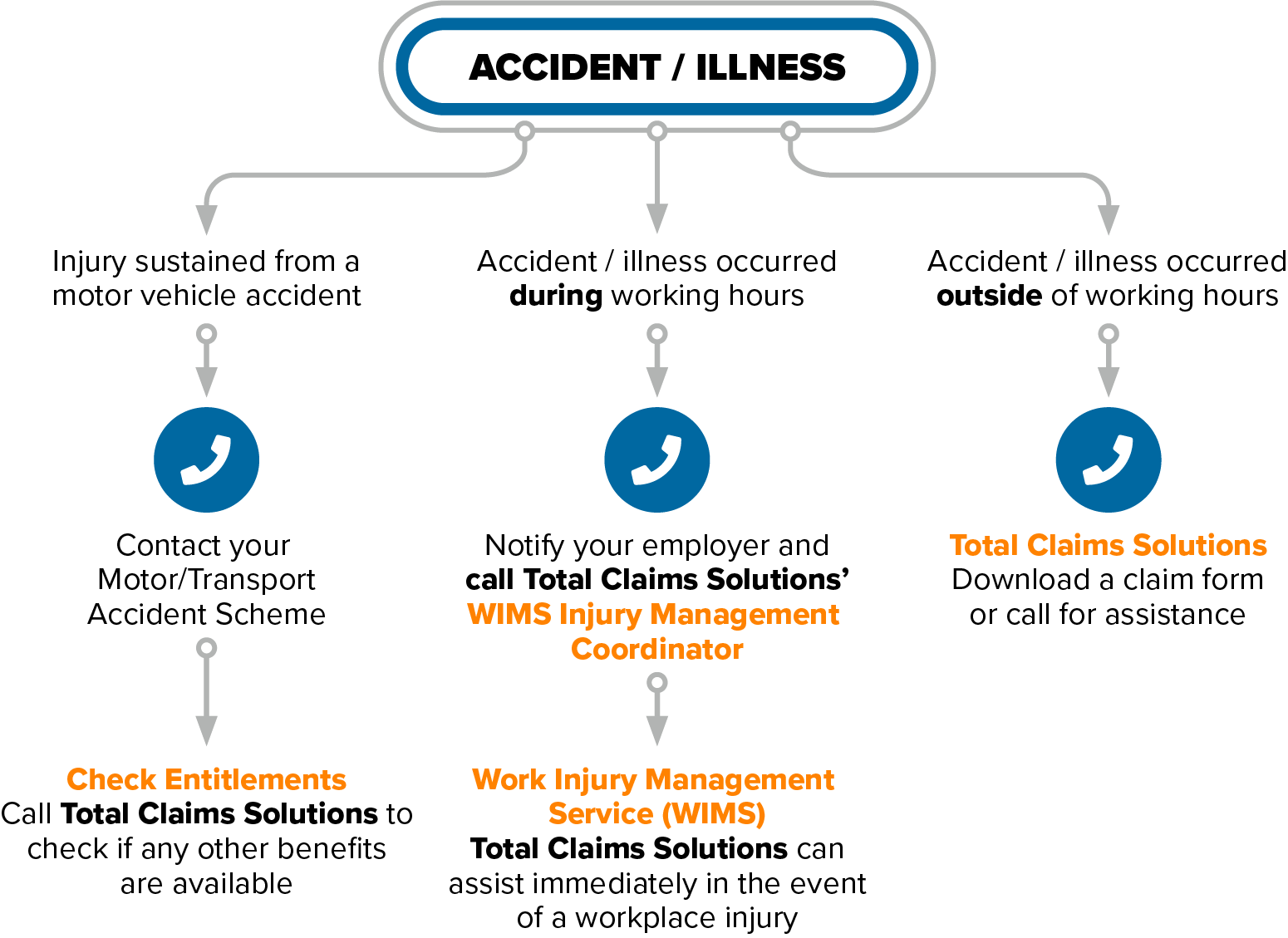
If you have experienced an injury or illness and would like to make an insurance claim, the first step is to contact the right provider.

Steps to Lodging a Claim
- Download the relevant claim form and TFN Declaration
- Complete all sections of the claim form (e.g Worker, Physician/Treating Doctor & Employer)
- Prepare or obtain all relevant documents (see checklist on front page of claim form)
- Send original claim form with all relevant documents to Total Claims Solutions, click here for contact details.
Your claim will then be assigned to a dedicated case manager who will support you through the entire claims process. Expect a call shortly after you lodge your claim.
If you have any enquiries or need help lodging a claim, please contact us.
INCOLINK VIC-TAS Brochure and Claim Forms

Download the relevant claim form and Tax File Declaration (if applicable)
Emergency Transport Claim Form
TFN Declaration Form not required
Dental Claim Form (accidental only)
TFN Declaration Form not required
Deceased Estate Claim Form – with Probate
Deceased Estate Claim Form – without Probate
Deceased Claim Form– Spouse or Dependant
From Monday, 18 August 2025, Total Claims Solutions will manage all new Discretionary Funeral Cover claims for Incolink members.
- New claims lodged on or after 18 August 2025. Download the claim form and send it to Total Claims Solutions at claimsVIC@totalclaims.com.au or post.
If you have already received a claim form from Incolink before this date (but have not yet submitted it), you may still complete that form and send it to Total Claims Solutions. - Existing claims lodged before 18 August 2025 (currently being assessed). If you have already submitted a completed claim form to Incolink before this date, Incolink will continue to manage your claim until it is finalised. Please contact Incolink on (03) 9639 3000.
Important: PSLI is insurance, not automatic leave entitlement.
While your sick leave days are recorded with Incolink, eligibility is determined by policy terms, not just your accumulated balance. Claims require supporting medical evidence from a registered medical practitioner demonstrating you’re medically unfit to work. PSLI does not cover work-related injuries or illnesses where WorkCover may apply – these should be handled through your employer’s workers’ compensation process. Before lodging your claim, confirm your employer is paying PSLI contributions and check your accumulated days through WorkerLink.
Download claim form here:
Portable Sick Leave Claim Form
For full details of the Incolink Accident & Illness Benefits Program, download the brochure from Incolink’s website.

Get in touch with us today
Can’t find what you’re looking for or need to chat to a case manager before lodging a claim? Please contact us and we’ll help you right away.


